~4x
remote MCP deployments since May 2025. of the 20 most-searched servers, 80% offer remote deployment.
no SDK shortcuts / vcn #34 / your repo is an MCP server by 10pm
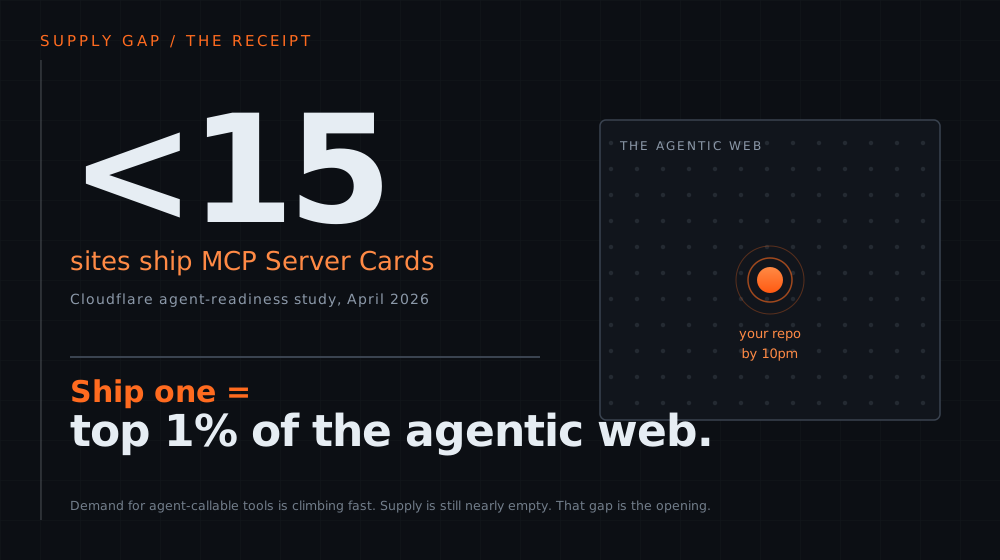
Cloudflare Agent Readiness study, April 2026 / 200,000 most-visited domains analyzed. the supply side of the agentic web is nearly empty.
mcp_remote_growth / srinivasan_production. the gap is not "no servers." it is "no front door an agent can find." you fix the front door tonight.
you walk out tonight with your own MCP server. three of your functions, agent-callable. by 10pm.
ship one working MCP server and you are, measurably, in the top ~1% of the agentic web. that is the receipt. now the foundation.
MCP is a JSON-RPC client-server interface for secure tool invocation and typed data exchange between an LLM application and external tools, data, and prompts.
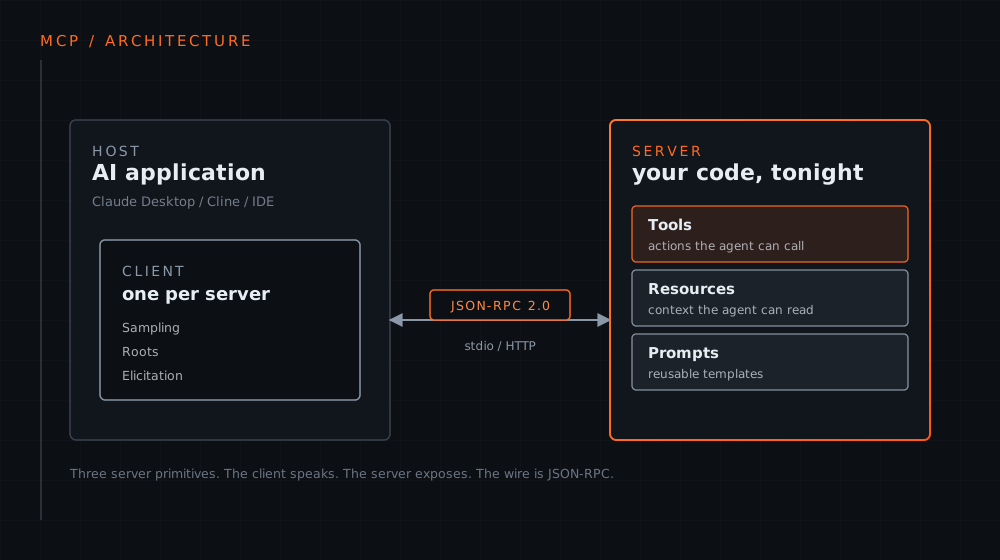
ehtesham_survey (arXiv:2505.02279). that is the whole idea. everything tonight is an implementation detail of this one line.
Anthropic donated MCP to the Agentic AI Foundation (AAIF) on 2025-12-09. AAIF is a directed fund under the Linux Foundation, co-founded by Anthropic, Block, and OpenAI.
MCP joins goose (Block) and AGENTS.md (OpenAI) as anchor projects. Platinum members include AWS, Anthropic, Block, Bloomberg, Cloudflare, Google, Microsoft, OpenAI. Each project keeps full autonomy over technical direction.
2025-11-25 shipped on MCP's one-year public anniversary and adds an experimental Tasks primitive (any request can become call-now or fetch-later). We teach the first stable model and name its successor so nobody is misinformed.
aaif / mcp_spec_2025_06_18 / mcp_spec_2025_11_25.
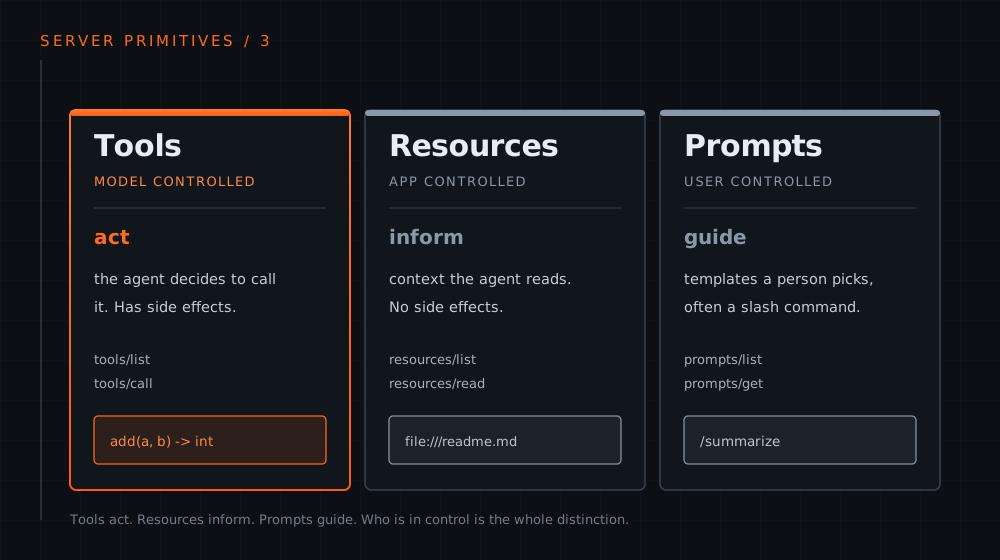
mcp_spec_2025_06_18. tonight we ship Tools and one Resource. the other four are real, just not on the critical path.
// the call. ASCII-safe, copy it.
{"jsonrpc":"2.0","id":2,
 "method":"tools/call",
 "params":{
   "name":"add",
   "arguments":{"a":2,"b":3}}}

// the reply.
{"jsonrpc":"2.0","id":2,
 "result":{
   "content":[
     {"type":"text","text":"5"}],
   "isError":false}}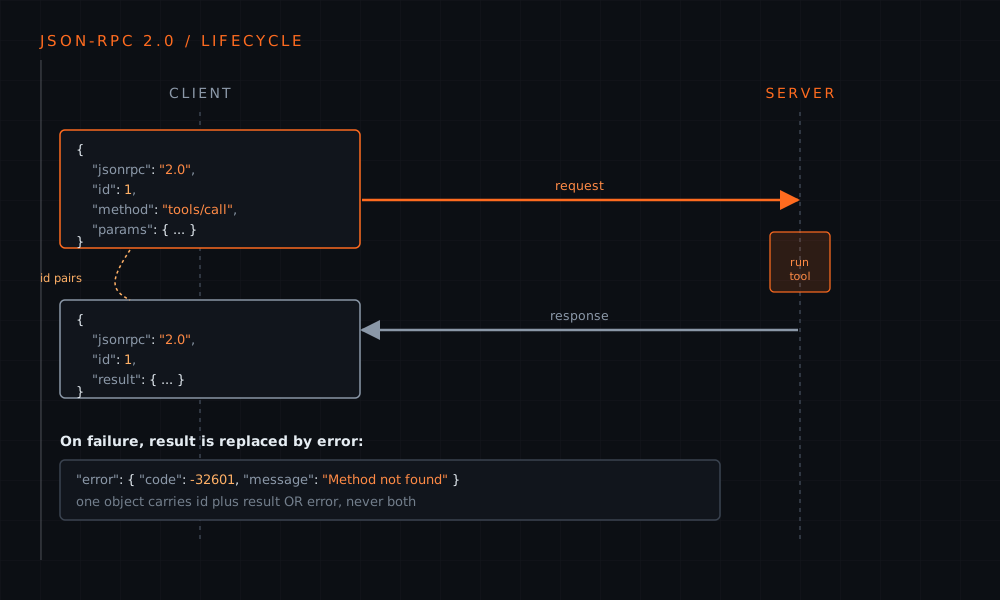
mcp_python_sdk. you already know this if you have used any RPC. the id pairs the reply to the request. that is the whole protocol.
one process, one client, local only. what Claude Desktop and CLI tools expect. single-process glue.
network reachable, multi-client, bidirectional. one /mcp endpoint carrying a session.
streaming-style transport for the cases that need a long-lived push channel.
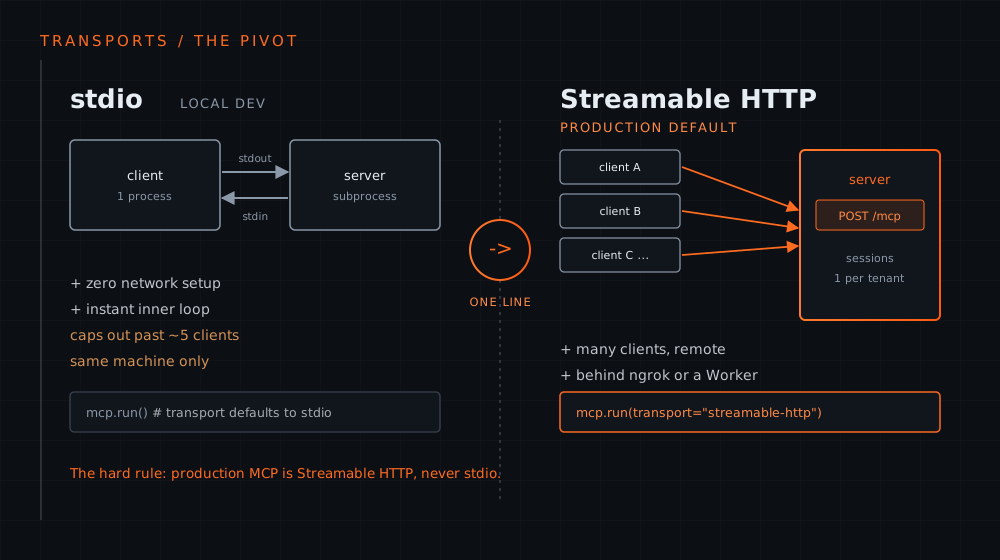
fastmcp / mcp_spec_2025_06_18. Segment 2 is the one-line pivot from the left card to the middle card.
ehtesham_survey. the survey's phased roadmap is the exact arc this VCN series walks: MCP for tools, then ACP, then A2A, then ANP. WebMCP pushes MCP into the browser.
The model gets back one thing from tools/list. A name. A description. An input schema. That prose IS the signal it acts on.
design rule, carried into Segment 3: verbose is fine. ambiguous is fatal. the description is written for the model, not the human reader.
// what the agent actually receives
{
  "name": "add",
  "description":
    "Add two integers a and b.
     Returns their sum.",
  "inputSchema": {
    "type": "object",
    "properties": {
      "a": {"type":"integer"},
      "b": {"type":"integer"}}}
}
mcp_python_sdk / tscg. this is the hinge of the whole night. the schema is the product, not the code behind it.
mcp_reference_servers (modelcontextprotocol/servers). intentionally minimal. read Everything first when you want to see all six features at once.
"write a server from scratch."
"make an existing FastAPI product agent-callable."
fastmcp / fastapi_mcp. we use FastMCP tonight because we are building from zero. neither is evangelized. the choice is about your starting point.
Tools split into perception (read), reasoning (analyze), and action (modify the world). Software development is 67% of all agent tools and 90% of MCP server downloads. The room tonight is the dead center of the distribution.
stein_177k (arXiv:2603.23802, UK AISI + Bank of England). higher stakes are arriving: payment-execution servers grew from 47 to 1,578 in thirteen months.
mcp_universe (Salesforce AI Research, arXiv:2508.14704). both failure modes are server-design problems, not just model problems. the gap is your opportunity.
The old question was does a server even exist. Stein plus TSCG show the binding constraint flipped to do small models reliably use the schema. Production frameworks ship tool schemas as JSON, a format built for machine parsing, not for model interpretation.
tscg (arXiv:2605.04107) / stein_177k. for 4B to 14B models this protocol mismatch is the majority of tool-use failure. a server existing is necessary, not sufficient. we return to this hard at the discord slide.
fastmcp / mcp_spec_2025_06_18. talk, then hands-on, per segment. you build alongside, not after.
Frontier Tower Floor 9. ask out loud the moment you are stuck. a broken demo in the room beats a clean one you watched.
fastmcp. every handout server actually boots. the run-receipts are pasted in the repo so you can diff your terminal against ours.
cloudflare_agent_readiness / mcp_universe / tscg / stein_177k / fastmcp / srinivasan_production.
with Server Cards on fewer than 15 sites and 4% of top domains agent-ready, the builder who walks out with a running, agent-callable MCP server is measurably in the top ~1% of the agentic web.
Not a slide you watched. A server you can curl. Three of your functions an agent can call. The supply side of the agentic web is nearly empty. Tonight you put something on it.
cloudflare_agent_readiness. we close on this exact receipt at the end. first we build it.
Enough context. FastMCP add(a, b) over stdio. The minimum legal MCP server, in about ninety seconds. Open your terminal.
FastMCP turns one plain Python function into an agent callable tool. No SDK boilerplate, no schema written by hand. Six lines in a file, one run command, and a real MCP server is alive on your laptop. This is the minimum legal server, and it is the spine of everything that follows tonight.
from fastmcp import FastMCP

mcp = FastMCP("hello")

@mcp.tool
def add(a: int, b: int) -> int:
    """Add two integers and return the sum."""
    return a + b

if __name__ == "__main__":
mcp.run()FastMCP, PrefectHQ. powers ~70% of MCP servers, ~1M downloads a day. [fastmcp]
FastMCP is the server. It owns the registry of tools, resources, and prompts, and it knows how to speak the wire protocol."hello" is the server name an agent sees on connect. The first piece of identity the agent reads. Make it specific.a: int, b: int). The docstring becomes the description, which is the agent's primary signal for when to call.type hints become the schema; the docstring becomes the description. [fastmcp][mcp_python_sdk]
# install once
pip install fastmcp

# run the server
python server.py
It prints a startup banner, then sits there silently waiting for a client on stdin. That is correct. A bare stdio server has no terminal UI. It is a pipe, not an app. Stop it with Ctrl-C.
mcp.run() with no argument defaults to stdio transport. [fastmcp]
A server that advertises even one tool over stdio satisfies the full call loop.
inputSchema. Discovery.all three over JSON-RPC 2.0. that loop is the whole protocol. [mcp_python_sdk]
The official local web UI. See the tool list, fire add from a form, read the raw frames.
Point its MCP config at python /full/path/server.py, then ask it to add two numbers.
Same config shape inside VS Code. All three speak the same JSON-RPC loop over the same pipe.
fastmcp dev server.pyClaude Desktop, Cline, MCP Inspector. one loop, any client. [mcp_python_sdk]
{"jsonrpc":"2.0","id":2,
 "method":"tools/call",
 "params":{
   "name":"add",
   "arguments":{"a":2,"b":3}
}}{"jsonrpc":"2.0","id":2,
"result":{
"content":[
{"type":"text","text":"5"}
],
"isError":false
}}One request. One response. The id pairs them. The "text":"5" is your function's return value, marshalled back across the wire. That is an MCP call.
tools/call params name + arguments; result is a content array. [mcp_python_sdk]
Install FastMCP, write the six lines, boot it, then call the tool with a raw JSON-RPC ping. Copy buttons on every block. macOS, Linux, and Windows PowerShell variants. Do it now on your own laptop.
open lab 01 · six line server ->UnicodeEncodeError: 'charmap' codec can't encode character
Windows default stdout is cp1252. One fancy character in a print() or a docstring crashes the process. And stdio IS stdout, so a stray print to stdout corrupts the JSON-RPC stream. Keep all logging on stderr. If you genuinely need Unicode IO: import sys; sys.stdout.reconfigure(encoding="utf-8").
caught live on every Windows attendee in a prior lab. [self: manifest][mcp_spec_2025_06_18]
next: this exact server, production transport, a public URL.
stdio is a local pipe. It works for one client on your machine and dies the moment you want more. The good news: the server does not change. You flip one argument in run(), and the same tools answer HTTP at /mcp. Then ngrok puts that endpoint on the public internet.
One process pair, one stdin/stdout pipe. No concurrency. It does not scale to many concurrent clients.
There is no URL and no network. Nothing remote can reach it. A pipe has no front door.
stdio implementations SHOULD NOT follow the HTTP auth spec and read credentials from the environment instead. By design, not multi tenant.
MCP-Universe names long-context and unknown-tools as failure modes that compound under real load. [fastmcp][mcp_universe][mcp_spec_2025_06_18]
    mcp.run()
    mcp.run(transport="http", host="127.0.0.1", port=8000)
Everything above the run call is byte for byte identical to Segment 1. transport="http" is FastMCP's Streamable HTTP transport. The string "streamable-http" is an accepted alias for the exact same thing, so you will see both in the wild.
same server, same tools, one argument. the most memorable lesson of the night. [fastmcp]
HTTP/1.1 200 OK
content-type: text/event-stream
mcp-session-id: 40d353dd9f414e749b462b15fe160a91

event: message
data: {"jsonrpc":"2.0","id":1,"result":{
  "protocolVersion":"2025-06-18", ... ,
"serverInfo":{"name":"hello-http","version":"3.3.1"}}}verbatim from the booted server in RUN-RECEIPTS.md. [fastapi_mcp]
# register your token once
ngrok config add-authtoken YOUR_TOKEN

# with server.py running on 8000, tunnel it
ngrok http 8000Forwarding https://a1b2-203-0-113-7.ngrok-free.app -> http://localhost:8000Your public MCP endpoint is that URL with /mcp on the end. Hand it to any remote client, anywhere. The server you wrote in Lab 01 is now on the internet.
standard ngrok usage; no special MCP claim. [self]
The moment a browser based agent reaches your server, the browser sends a preflight. Miss the CORS headers and the request dies with no useful error in your logs, just a dead client. ngrok forwards faithfully, so this bites in prod, not in your terminal tests. Set CORS on both paths:
Allow your agent's origin, the POST and GET methods, and the Mcp-Session-Id header. FastMCP lets you pass CORS middleware when you build the HTTP app.
browser-side agents silently fail without CORS on both paths. [cloudflare_remote_mcp]
curl -s -L -X POST https://a1b2-203-0-113-7.ngrok-free.app/mcp \
  -H "Content-Type: application/json" \
  -H "Accept: application/json, text/event-stream" \
  -d '{"jsonrpc":"2.0","id":1,"method":"initialize","params":{"protocolVersion":"2025-06-18","capabilities":{},"clientInfo":{"name":"remote","version":"0"}}}'
Streamable HTTP needs both content types in the Accept header. The -L is load bearing: without it curl will not follow the 307 and you get an empty body. Point any remote MCP client at the same URL and it speaks the same loop.
the trailing-slash 307 trap, verbatim from the handout. [fastapi_mcp]
Flip the transport, watch the server bind a port, confirm the endpoint answers, then tunnel it with ngrok and curl it from anywhere. The trailing-slash 307 trap and the stdio-vs-HTTP comparison are both in here.
open lab 02 · streamable http ->
The hard rule, one more time: production MCP is Streamable HTTP, never stdio. stdio is the local dev pipe. HTTP is the front door.
[fastmcp][mcp_spec_2025_06_18]
next: hardening the posture, then wiring your own tools.
You do not need this tonight. You need to know it exists. On Cloudflare, McpAgent gives a Durable Object per client session with built in state and both SSE and Streamable HTTP transports. Multi tenant isolation is a trustedIssuers resolver that reads identity per tenant without a redeploy.
the five design dimensions to harden once you are remote. [cloudflare_remote_mcp][srinivasan_production]
A toy add over a public URL proves the protocol. The next move is the one you came for: wrap three of your own functions, and give the agent the context it needs to call them well.
segment 3: bring your own tools.
SEGMENT 3 / 4
You already have functions. This stop makes three of them agent-callable, then hands the agent context to ground on.
stop 1 hello world DONE stop 2 streamable HTTP DONE stop 3 your tools stop 4 oauth
Wrapping is the move you already know. @mcp.tool over a function. The type hints become the schema. No rewrite.
from fastmcp import FastMCP

mcp = FastMCP("byo-tools")

@mcp.tool
def convert_length(value: float, from_unit: str, to_unit: str) -> float:
    """Convert a length between metric and imperial units.

    Supported units (case-insensitive): mm, cm, m, km, in, ft, yd, mi.
    Returns the converted value as a float. Raises ValueError on an
    unknown unit so the agent gets a clear, actionable error.
    """
    ...

@mcp.tool
def password_strength(password: str) -> dict:
    """Estimate the strength of a password and explain the score. ..."""
    ...

@mcp.tool
def text_stats(text: str) -> dict:
    """Return word count, character count, and a reading-time estimate. ..."""
...Verbose is fine.
Ambiguous is fatal.
The description prose IS the agent's primary signal for whether and how to call. (TSCG)
Do this.
An action the agent invokes. It computes or changes the world. It can have side effects. convert_length is a tool.
Know this.
Read-only context the agent pulls in, addressed by a URI like a file. No side effects. guide://tool-design is a Resource.
Mixing the two is the classic beginner error. "Get the current config" that only reads is a Resource. "Restart the service" is a Tool.
A Resource is just a function with @mcp.resource and a URI. The agent reads it. It does not call it like an action.
@mcp.resource(
    "guide://tool-design",
    name="tool_design_guide",
    description="House rules for writing agent-callable tool descriptions.",
    mime_type="text/markdown",
)
def tool_design_guide() -> str:
    """Serve the tool-design cheat sheet as a Resource."""
    return (
        "# Tool design for agents\n\n"
        "1. The description is the agent's only signal. "
        "Verbose is fine, ambiguous is fatal.\n"
        "2. Name the units and the return shape in the docstring.\n"
        "..."
    )
In a real client: resources/list shows guide://tool-design, then resources/read pulls the document into context. Booted in the handout, receipt is real.
tools/list -> "do_thing"
  desc: "performs the operation
         on the input as configured"
  params: { x, y, z, opts, flags, ctx,
            mode, extra, meta, ... }

small model picks: nothing
                   wrong tool
                   empty args
result: FAIL

# tighten one line:
  desc: "Convert length between
         mm,cm,m,km,in,ft,yd,mi.
         Returns a float."

small model picks: convert_length
result: PASS
Same model. Same task. Only the schema changed.
0%->84.4%
Phi-4 14B tool-use accuracy at 20 tools, deterministic schema rewrite. 90.3% at 50 tools.
The constraint flipped. Not "does a server exist." Now: "do small models actually USE the schema."
TSCG, arXiv 2605.04107. JSON schemas are parser-shaped, not model-shaped. For 4B to 14B models, this mismatch is the majority of tool-use failure.
Three sample tools and one Resource, ready to run. Delete the samples, paste your own functions, ship.
Checkpoint · segment 3
Real functions, exposed as tools. A Resource for grounding. Schemas a small model can read. That is a working server other agents can pick up and use.
SEGMENT 4 / 4
In dev you skip auth. In prod you pay for it. The thing you actually ship is one JSON file at a fixed URL.
stop 1 DONE stop 2 DONE stop 3 DONE stop 4 oauth
The MCP Safety Audit coerced Claude 3.7 and Llama-3.3-70B, via tools on DEFAULT servers, into three attack classes.
The spec's named risk is the confused-deputy problem. A server acting as a middleman to third-party APIs gets tricked into using stolen authorization codes to obtain tokens without user consent.
The audit ships MCPSafetyScanner, the first agentic tool to audit an arbitrary MCP server before deployment.
RFC 9728
Under spec 2025-06-18 a protected MCP server is an OAuth 2.1 Resource Server. Auth is optional, but when present over HTTP it follows this exactly.
implement RFC 9728 and include an authorization_servers field with at least one auth server.
return WWW-Authenticate on a 401, pointing at the resource metadata URL.
send a resource parameter (RFC 8707) binding the token to ONE server, so a malicious server cannot reuse it.
reject tokens that do not name it in the audience claim, and never pass a client token upstream.
One route. Two load-bearing fields. It says WHERE to authenticate. It does not mint tokens.
@mcp.custom_route("/.well-known/oauth-protected-resource", methods=["GET"])
async def oauth_protected_resource(request: Request) -> JSONResponse:
    metadata = {
        "resource": RESOURCE_BASE + "/mcp/",
        "authorization_servers": [AUTH_SERVER],
        "bearer_methods_supported": ["header"],
        "scopes_supported": ["mcp.read", "mcp.write"],
        "resource_documentation": RESOURCE_BASE + "/docs",
    }
    # CORS so browser-side agents can read it cross-origin.
    headers = {"Access-Control-Allow-Origin": "*"}
    return JSONResponse(metadata, headers=headers)
Your server is a resource server, not an authorization server. resource names you. authorization_servers is where the client goes. The CORS header is not optional for browser agents.
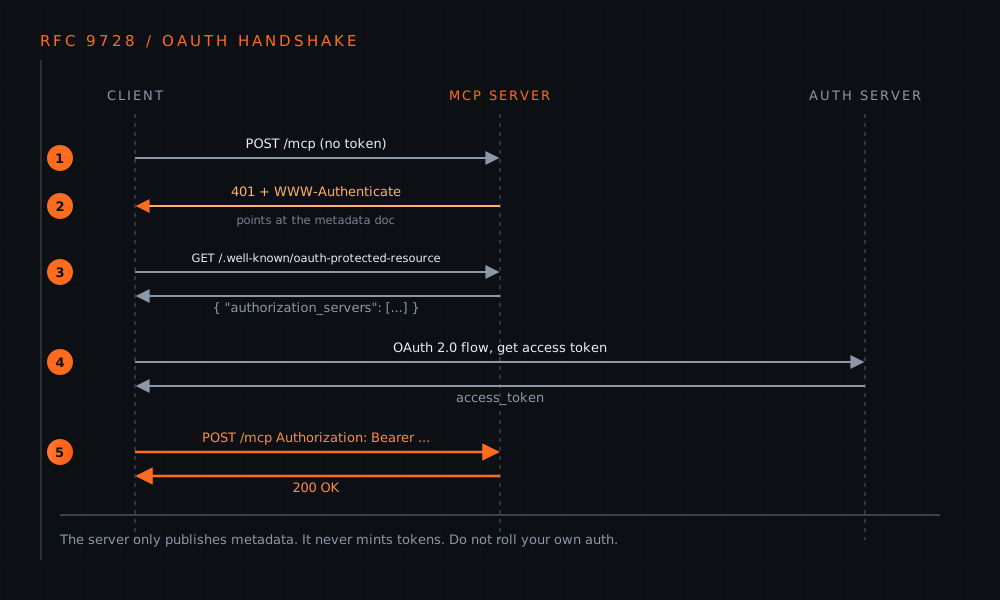
401 with WWW-Authenticate, fetch the well-known doc, run OAuth against the auth server it names, retry with Bearer. stdio dev skips all of this. The bill comes due in prod, where you are a resource server on the public internet.
It is the #1 production MCP failure.
The metadata stub you just saw. One JSON document. You can hand-write it.
Token issuance, PKCE, refresh, key rotation, revocation. Get it wrong and you get confused-deputy attacks and token leakage.
Use a managed provider. Cloudflare's workers-oauth-provider wraps your Worker as a spec-compliant OAuth provider to clients and an OAuth client to your upstream. Or point authorization_servers at Auth0, Clerk, Okta, and just validate the JWT.
The hard 90%, delegated
FastMCP ships native auth providers (Clerk, Auth0, WorkOS, Descope). Wire one in, and the server runs the OAuth flow to it and validates every token. You write none of the crypto.
from fastmcp import FastMCP
from fastmcp.server.auth.providers.clerk import ClerkProvider

auth = ClerkProvider(
    domain="your-app.clerk.accounts.dev",
    client_id="...",
    client_secret="...",
    base_url="https://your-server.com",
)

mcp = FastMCP("hello-toolsmith", auth=auth)
Now FastMCP serves the /.well-known metadata, returns the 401 with WWW-Authenticate, and validates each bearer token against Clerk by introspection. The stub you just wrote collapses into one argument. Clerk holds the tokens, the keys, the rotation.
A real MCP HTTP server plus the well-known route. Boot it, curl the metadata, read the two fields.
python server.py
curl -s http://127.0.0.1:8000/.well-known/oauth-protected-resource

{"resource":"http://127.0.0.1:8000/mcp/",
 "authorization_servers":["https://auth.example.com"],
 "bearer_methods_supported":["header"],
"scopes_supported":["mcp.read","mcp.write"]}Access-Control-Allow-Origin on /mcp and /.well-known/* means browser-side agents fail silently.MCP is Layer 4, tool execution. The rest of the stack, and the open problems, are the rest of this series.
Model-shaped schemas, not parser-shaped. TSCG is an active direction, not a settled tool. Expect this to become first-class.
Agents skip needed tool calls or fire ones they should not. Sparse autoencoders plus probes read model state before each action.teaser for VCN #38
MCP for tools, then A2A for agent-to-agent via Agent Cards, then ANP for decentralized discovery.VCN #35 / #36 / #37 / #39
MCP Server Cards on fewer than 15 sites. Only 4% of the top 200,000 domains are agent-ready. You walked in with an idea. You walk out with a running, agent-callable MCP server. That is, measurably, the top ~1% of the agentic web.
Four servers, all booted, all with paste-the-output receipts. The labs run on a stranger's laptop with python and fastmcp.
Keep building: swap your own functions into 03_byo_tools, then publish a /.well-known/ai-agent.json so agents can find you. Both patterns are in the handout.
Vibe Coding Nights runs weekly at Frontier Tower. The agentic-web stack, one layer at a time.
Find every event on Luma. Get the weekly intel in THE SIGNAL, Immersive Commons' AI dispatch. Both links on the handout.
One more thing.
GET /.well-known/ai-agent.json   -> the agent card for this deck
navigator.modelContext.registerTool("next_slide")
navigator.modelContext.registerTool("goto_slide")
It ships its own agent card and registers two live WebMCP tools. An agent in this room, in a WebMCP browser, could have advanced these very slides. The same resource-server, well-known, discovery posture segment 4 just taught. The thesis, run on itself.
Hosted by Rayyan Zahid, Michalis Vasileiadis, Eric Mockler, and Devinder Sodhi.
Vibe Coding Nights #34 · Toolsmith · Frontier Tower Floor 9.
Licensed CC BY-SA 4.0. Take it, fork it, run your own. Now go ship a server.
FORG
vcn-34-toolsmith.vercel.app/?as=remote&room=FORG
waiting for phone…
tap outside or press ESC